Building Production-Ready AI Agents in n8n: Architecture, Memory, Validation and Error Handling
The first time our sales agent saved a customer's name into the phone number field, nothing crashed.
The workflow turned green. The database accepted the row. The agent replied politely. By every visible signal, the system was working perfectly.
It was only days later, when someone tried to call that lead, that the problem appeared. There was no error to catch, because technically nothing had failed. The data was simply wrong.
That moment changed how we think about AI agents.
Why building an AI agent in n8n is easy, but making it reliable is hard
Building an AI agent that answers questions, calls tools or saves information to a database is no longer complicated. With n8n, you can build a workflow that does all of this in a single afternoon.
But there is an important question:
What happens when that same agent is no longer a demo, but is responsible for hundreds of real customers tomorrow?
Imagine a sales agent for a hotel. A guest asks about room prices, the agent fetches the data and replies. So far, so good.
Now several things happen at the same time:
- Two guests try to book the same room.
- The AI model provider is temporarily unavailable.
- The model returns messy text instead of valid JSON.
- The same request reaches the workflow twice.
- The agent sends incorrect data to the database.
In a demo, you may never see any of these. In production, each one becomes an operational failure or a bad customer experience.
This is where the difference between building an AI agent and engineering a system built on AI agents becomes clear.
This article is not about building a simple agent. It is about the architectural decisions that make an n8n workflow ready for real use: responsibilities, memory, validation, error handling, duplicates and how to measure whether the whole thing is actually working.
1. Define the agent's contract before choosing a model
A common mistake is to start with the model and the prompt.
Before either, answer three questions:
- What exactly is this agent responsible for?
- Which data is it allowed to read or change?
- What should it do when it cannot complete its task with confidence?
We write the answers down as a short agent contract. Here is a real example for a lead-qualification agent:
- Responsibility: Talk to website visitors, understand their business need, capture contact details, save a qualified lead.
- Inputs: Visitor message, conversation history, business ID.
- Allowed tools: Read service information; create one lead record.
- Forbidden actions: Deleting records, changing prices, confirming contracts, contacting third parties.
- Output: A JSON object with fixed fields (name, phone, email, sector, need, status).
- When unsure: Save the lead as `needs_review` with a reason, and notify a human.
The key insight: this boundary is not a prompt decision. Writing "never delete customers" in a system prompt is a suggestion, not a guarantee. The contract must be enforced in three places:
- Tools: If the agent must not delete, it is simply never given a delete tool.
- Permissions: The credentials behind each tool only allow what the contract allows.
- Workflow logic: Every output passes through checks that do not depend on the model behaving well.
Design principle: Every agent needs a clear responsibility, a defined input, a validatable output and explicit access limits.
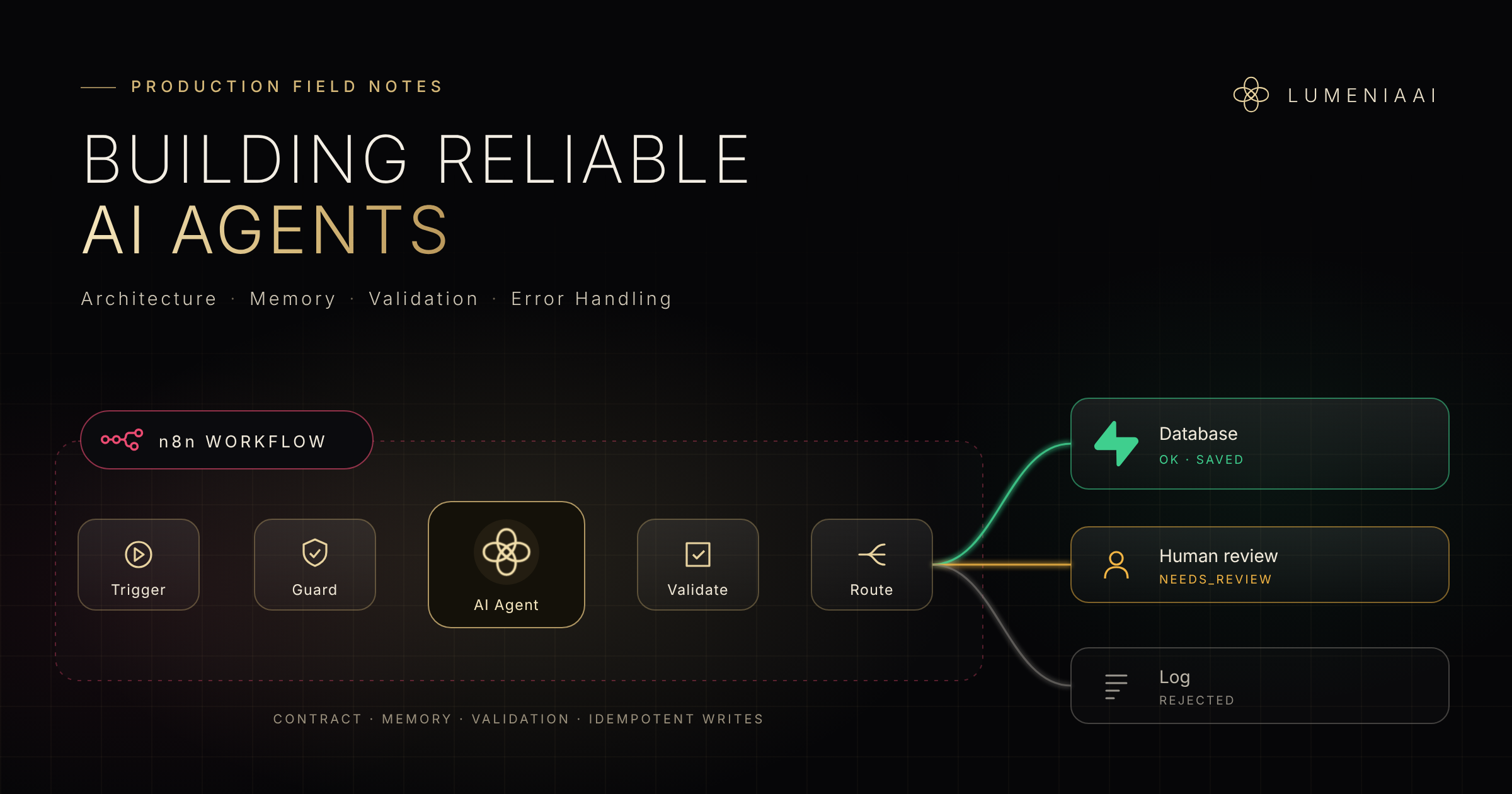
2. The anatomy of a production-ready agent workflow
A demo workflow often looks like this: Trigger → AI Agent → Database.
A production workflow has more steps, and each one exists for a reason:
- Trigger — a webhook, form, chat message or schedule.
- Normalize the input — trim text, unify formats, attach the business (tenant) ID and a unique request ID.
- Guard — check that the tenant is valid, apply rate limits, and stop if this request ID was already processed.
- AI Agent — model + memory + a small set of tools.
- Validate — a Code node checks the output against the contract.
- Route — a Switch node sends the result to one of three paths: `ok`, `needs_review` or `rejected`.
- Write — save the result through a single, narrow, idempotent database operation.
- Notify — send a short alert to the team only when a human is needed.
- Log — record the run: status, reason, model, tokens, cost and duration.
Steps 2, 3, 5, 6 and 9 are invisible in a demo. They are also exactly what keep the system alive in production.
3. Memory and tools: give the agent context, not control
Memory is for the conversation, not for the truth
Chat memory lets the agent remember what was said a few messages ago. Three rules keep it safe:
- Scope the session key to both the business and the user (for example `tenant:user`). A shared or poorly scoped key can mix two conversations, or worse, two businesses.
- Keep the window short. The agent needs the recent conversation, not the entire history. Long windows raise costs and confuse the model.
- Never treat memory as a source of business data. Prices, availability and customer records come from tools that read the database at that moment, not from what the agent "remembers".
Tools: least privilege, clear descriptions
Every tool is a door into your system. Give the agent as few doors as possible:
- Read tools return only the data of the current business.
- Write tools do one specific thing, such as "create a lead", rather than "run any query".
- Each tool and each field gets a clear description.
That last point fixed our phone-field bug. The fields the agent filled had no descriptions, so the model guessed. Adding one line to each field — "customer's full name, never a phone number" — made the problem disappear immediately.
Tool and field descriptions are part of your prompt. Treat them with the same care.
4. Validate the model's output before it touches your data
A language model does not return data. It returns text that usually looks like data.
So the rule is simple: nothing reaches the database until it has been validated.
Ask the model for structured JSON, then check it in a Code node:
- Are all required fields present?
- Are types correct (numbers are numbers, dates are dates)?
- Are values inside the allowed list (for example sector is one of the supported options)?
- Do phone numbers and emails match a valid format?
- Does the business ID match the request that started the workflow?
A simplified version:
```javascript const out = $json.output || {}; const reasons = [];
if (!out.name) reasons.push('missing name'); if (!/^\+?\d{10,13}$/.test((out.phone || '').replace(/\s/g, ''))) reasons.push('invalid phone'); if (!['hotel', 'clinic', 'construction', 'other'].includes(out.sector)) reasons.push('unknown sector');
return [{ json: { ...out, status: reasons.length ? 'needs_review' : 'ok', reason: reasons.join(', ') } }]; ```
Reject, do not silently repair
When the output is invalid, it is tempting to "fix" it in code. Do not. A silently repaired record looks valid and hides the real problem. Instead:
- Retry once, sending the validation error back to the model.
- If it still fails, do not guess. Route it to a human.
Three outcomes, not two
Most workflows only know success and failure. A reliable agent needs a third state:
- `ok` — complete and valid. Saved automatically.
- `needs_review` — saved, but a human must look at it. The original message and the reason are stored with it, and the team receives a short alert.
- `rejected` — spam or irrelevant. Logged only.
With this, nothing wrong enters the system, and no real customer is silently lost.
One more lesson: do not ask the model how confident it is. Models will happily report 95% confidence while being wrong. Measure confidence with rules you can check.
5. Errors, retries and duplicates
Separate temporary errors from permanent ones
Not every error deserves a retry.
- Temporary errors — timeouts, rate limits, a provider that is briefly down. Use n8n's Retry On Fail on the node, with a wait between attempts.
- Permanent errors — invalid input, missing permissions, a broken record. Retrying only repeats the failure. Route these to the error path immediately.
When the model provider is completely unavailable, the customer should still get a polite holding reply ("We received your message and will get back to you shortly"), and the request should be saved for later processing.
Build a central error workflow
Set an Error Workflow for every production workflow. It starts with n8n's Error Trigger node and sends a short alert to the team's alert channel: which workflow failed, at which node, and a link to the execution.
Keep alerts short. An alert should tell you what happened and where to look, not paste the entire AI answer into a chat window. If alerts become noise, people stop reading them, and then you have no alerting at all.
Make every write idempotent
Sooner or later, the same input arrives twice: a double-clicked form, a retried webhook, a resent message.
- Attach a unique request ID to every input, such as the message ID from the channel.
- Put a unique constraint on it in the database.
- When a duplicate arrives, skip it quietly instead of failing the whole batch. One duplicate should never cancel twenty valid records.
Some problems belong to the database, not the agent
Remember the two guests booking the same room? No prompt can solve that. A race condition is solved where the data lives: with a transaction, a lock or a unique constraint on the room and date. The agent asks for the booking; the database decides who gets it.
6. Measure performance, cost and reliability
If you do not measure an agent, you only have an opinion about it.
Log every run
Create a simple run log table with one row per execution: business ID, workflow, status, reason, model, tokens, cost and duration.
From that single table, you can track the metrics that matter:
- Success rate — what share of runs end as `ok`?
- Review rate — how often is a human needed? A rising number is an early warning.
- Validation failure rate — how often does the model's first answer fail your checks?
- Duplicate rate — how often do repeated inputs arrive?
- Response time — especially the slowest runs, not just the average.
- Cost per successful outcome — not cost per call, but cost per qualified lead, per booking, per report.
Keep a test set and replay it
Collect 20 to 30 real, anonymized inputs, including the difficult ones. Before every prompt change or model switch, run them all again and compare the results.
This is how we caught our scoring agent marking almost every business as "high priority". A vague instruction like "score from 1 to 100" produced inflated scores. The fix was a point-based rubric with evidence required for every point, and the test set proved the change worked before it went live.
Spend on intelligence only where it matters
Not every step needs the strongest model. Use a small, fast model for summarizing and cleaning text, and a stronger model where judgement matters: talking to customers, scoring, writing. The cost-per-outcome metric shows you exactly where the money goes.
7. A note on security in multi-tenant systems
When one system serves many businesses, the biggest risk is not a wrong answer. It is one business seeing another business's data.
- Every record carries a business (tenant) ID.
- The database enforces who can read and write each row, not the application and not the prompt.
- Public keys used by websites and apps are read-only; writes go through authenticated users or server-side workflows.
- Powerful service credentials live only inside n8n credentials, never in a front end, a file or a prompt.
The production checklist
- [ ] A written contract for every agent
- [ ] Input normalization and a unique request ID
- [ ] Tenant check and rate limits before the agent runs
- [ ] Session keys scoped to business and user
- [ ] Least-privilege tools with clear descriptions
- [ ] Structured output and a validation Code node
- [ ] Three outcomes: `ok`, `needs_review`, `rejected`
- [ ] Retries for temporary errors only
- [ ] A central error workflow with short alerts
- [ ] Unique constraints and quiet duplicate handling
- [ ] A run log with success, review, cost and latency metrics
- [ ] A test set replayed before every change
Conclusion
Building an AI agent is a prompt problem. Running one in production is an engineering problem.
The difference is not visible in a demo. It shows up at 2 a.m., when a provider times out, a message arrives twice, or a model returns something almost right. A production-ready agent is not the one that never meets these moments. It is the one designed to handle them calmly, transparently and without corrupting your data.
At LUMENIAAI, this is the architecture behind the AI systems we run for hotels, clinics and construction companies, all from a single core. If you are building something similar, we hope it saves you a few of the lessons we learned the hard way.